A schema diagram looks dense, but it follows a handful of conventions: every box is a table, the bold rows are the primary key, rows marked FK point at other tables, and each line tells you which table depends on which. Once you can read those, you can understand an unfamiliar database in minutes, spot join tables and hierarchies at a glance, and notice design problems before they reach production.
Boxes, rows and types#
Each box is one table. The header carries the table name; each row below it is a column with its type on the right. In a diagram generated from a real database the type is whatever the engine reports, not what the migration said: a column declared as INT shows up as int4 on PostgreSQL, INT on MySQL and NUMBER on Oracle. Oracle also folds unquoted identifiers to upper case, so the same table appears as OWNERS there and as owners everywhere else; the Oracle notes explain why.
The type column is more useful than it looks. A varchar where you expected a number, a date where you expected a timestamp, or a text primary key are all things a diagram reveals faster than reading migrations.
Primary keys#
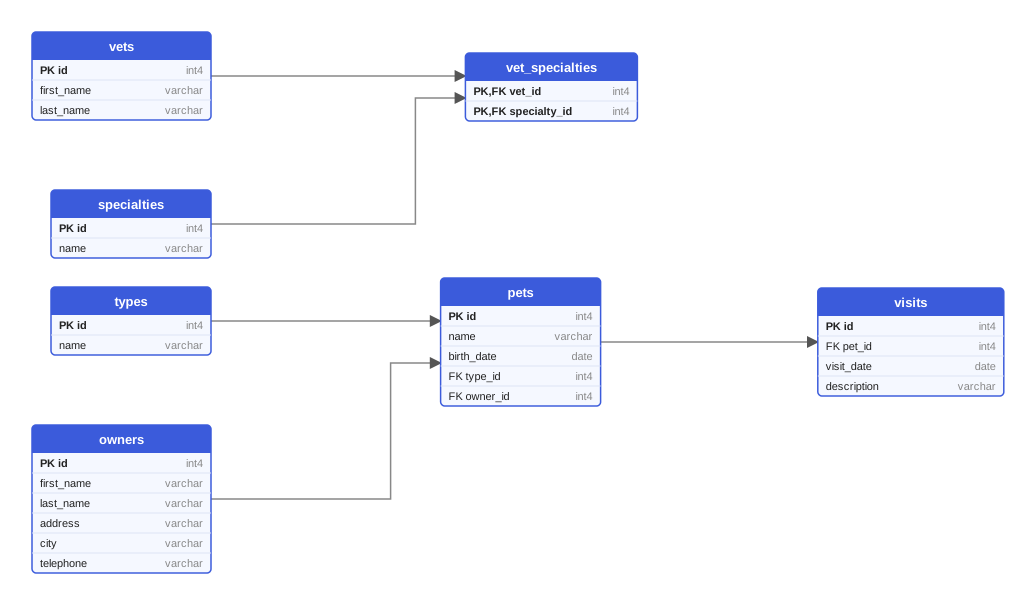
The primary key is the column, or set of columns, that identifies a row. Diagrams mark it in bold and with PK, and by convention list it first. Most tables in the PetClinic diagram above have a single-column key called id, a surrogate key with no business meaning.
When two or more rows are bold, the key is composite: the table vet_specialties is identified by the pair vet_id and specialty_id. Both rows carry the marker PK,FK, because each column is at the same time part of the key and a reference to another table. That combination is the fingerprint of a join table, which we will come back to.
Foreign keys and the direction of the arrow#
A row marked FK holds a foreign key: its values must exist as primary key values in another table. The line attached to it shows which table, and the label on the line is the name of the foreign-key column.
The direction of the line differs between tools, so check the legend once. In the diagrams on this site the arrow starts at the referenced table and points at the table that holds the reference: the arrow labeled owner_id runs from owners to pets. Crow's-foot tools put the three-pronged symbol at the "many" end instead, and UML tools put a multiplicity such as 0..* there. Whatever the drawing, the rule for reading it is the same: the foreign key lives on the "many" side, and the table it points to is the "one" side.
To find out what a table depends on, follow the lines that end at its FK rows. To find out what depends on a table, follow the lines that start at its primary key. Tables with only outgoing lines are the roots of the schema; tables with only incoming lines are its leaves.
The shapes relationships take#
Four shapes cover almost every line in a diagram, and each has a visual signature.
One-to-many#
The most common relationship: one row on the referenced side, many rows on the referencing side. Read owners to pets as "an owner has many pets, a pet has one owner", and pets to visits as "a pet has many visits, a visit belongs to one pet". The "one" side is always the table with the primary key; the "many" side is the table with the foreign key.
Whether the "one" is mandatory depends on nullability. A NOT NULL foreign key means every pet must have an owner; a nullable one would mean an orphan pet is allowed. Not every diagram shows nullability, and the ones generated by SchemaDrawer do not mark it by default, so when it matters look at the column definition in the migration.
Many-to-many and join tables#
Relational databases cannot store a many-to-many relationship directly; a vet has several specialties and a specialty belongs to several vets, and no single foreign key can hold that. The solution is a third table with one foreign key to each side, and it is easy to recognize in a diagram:
- the table has two (sometimes more) incoming arrows,
- its foreign-key columns together form the primary key, so they are marked
PK,FK, - it often has no other columns, or only a few attributes of the relationship itself, such as a date or a quantity.
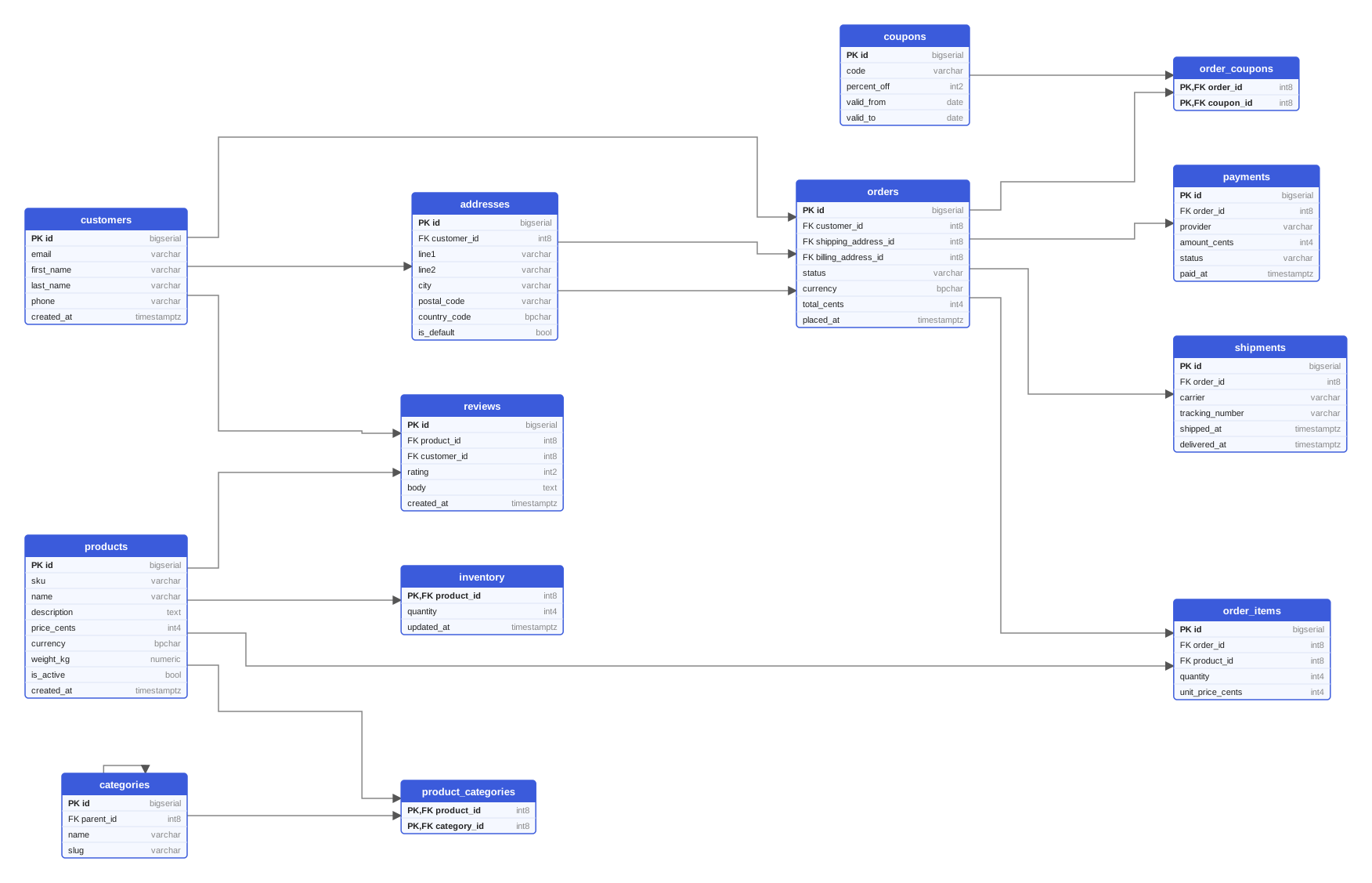
vet_specialties is the textbook case. In the e-commerce diagram below, product_categories and order_coupons play the same role, and order_items is a join table that grew attributes: it links orders to products but also stores quantity and unit_price_cents, and it has its own id instead of a composite key. Both styles are valid; the trade-offs are discussed in Many-to-many relationships: designing join tables.
One-to-one#
A one-to-one relationship is a foreign key that is also unique. The clearest form is a table whose primary key is itself a foreign key: inventory.product_id is marked PK,FK and is the only key column, so there can be at most one inventory row per product. Designers use this to keep rarely used or frequently updated data out of a main table, or to model an optional extension of an entity. If you see it where you did not expect it, ask whether the two tables should be one.
Self-references#
A table can reference itself. categories.parent_id points at categories.id, and the diagram draws an arrow that leaves the box and comes back to it. Self-references model hierarchies and trees: category trees, organizational charts, threaded comments, an employee's manager. The root of the tree is the row whose foreign key is null, which is why such columns are almost always nullable.
Reading a whole diagram#
With the pieces in place, a walk through the e-commerce schema takes about a minute.
- Find the roots.
customers,products,categoriesandcouponshave no foreign keys to other tables, so everything else hangs off them. - Follow the main spine. A customer has addresses and orders; an order has items, payments, shipments and coupons. That chain is the business process.
- Spot the join tables.
product_categoriesandorder_couponsare pure links;order_itemsandreviewslink two roots and carry data. - Notice the shapes.
inventoryis one-to-one withproducts;categoriesis a tree;ordersreferencesaddressestwice, once for shipping and once for billing, which is why two arrows with different labels connect the same pair of boxes. - Look for what is missing. No table references
reviewsorshipments; they are leaves. A leaf that you expected to be referenced, or a root that you expected to depend on something, is worth a question in code review.
Where SchemaDrawer fits#
Both diagrams in this article were generated by SchemaDrawer from Flyway migrations, by running them against a real PostgreSQL 18 in Docker and reading the resulting schema back. Each box, key marker and labeled arrow comes straight from the database's own metadata, which is why the types read int4 and varchar rather than what the SQL said. It draws tables, columns, primary keys and foreign keys, and nothing else. The examples page has the same schema drawn on several engines, and the introduction to ER diagrams covers the notations you will meet elsewhere.
Key takeaways#
- Bold rows marked PK are the key; several bold rows mean a composite key.
- Rows marked FK point at another table, and the foreign key always sits on the "many" side.
- A table whose foreign keys form its primary key is a join table; a table whose primary key is a single foreign key is one-to-one.
- An arrow that returns to its own box is a self-reference, and it usually means a tree.
- Start from the roots, follow the main spine, and ask about anything that is missing.