How to Generate an ER Diagram from Migration Files
Three ways to turn Flyway, Liquibase, Prisma or Django migrations into an ER diagram, and a step-by-step guide to the one that always matches reality.
From a multipart upload to an SVG: what happens to your files, what runs where, what the diagram contains and what it leaves out.
POST /api/v1/drawing takes your migration files as multipart form data, together with the tool, the engine and its version. The files are stored, the job is recorded as PENDING, queued, and the call returns 202 with the job id at once. A drawing is never done twice for the same Request-Id: a retried request gets the first job back.flyway migrate, prisma migrate deploy, python -m django migrate, dotnet build followed by the EF Core migrator, and so on. Credentials travel in environment variables, never on the command line.SUCCESS with a link that is valid for an hour.If anything fails along the way, the job ends as ERROR with the migration tool's own output, exit code included. A broken CREATE TABLE comes back with the same message Flyway or Prisma would print on your machine.
| Drawn | Not drawn |
|---|---|
| Every table the migrations leave behind, in every user schema of the engine | Views and materialized views, sequences, synonyms |
Columns with the type name the engine reports (int4, varchar, timestamptz on PostgreSQL; INT, VARCHAR on MySQL; NUMBER, VARCHAR2 on Oracle) | Lengths, precision and scale, defaults, auto-increment, comments |
| Primary keys, including composite ones, marked PK and set in bold | Unique and check constraints, indexes, triggers |
| Foreign keys, one arrow per referencing column, labelled with the column name, marked FK on the column | Constraint names, ON DELETE and ON UPDATE rules |
| Nullability is read and kept in the model | It is not marked in the picture by default |
Every migration tool records what it has applied in a table of its own. Only the chosen tool's tables are removed, by name, so a table of yours with one of these names would disappear as well:
| Tool | Hidden tables |
|---|---|
| Flyway | flyway_schema_history |
| Liquibase | databasechangelog, databasechangeloglock |
| golang-migrate, dbmate, ActiveRecord | schema_migrations (ActiveRecord also ar_internal_metadata) |
| Alembic | alembic_version |
| goose | goose_db_version |
| Atlas | atlas_schema_revisions |
| Prisma | _prisma_migrations |
| DbUp | schemaversions |
| FluentMigrator | VersionInfo |
| Doctrine | doctrine_migration_versions |
| Laravel, TypeORM | migrations |
| Django | django_migrations |
| Drizzle | __drizzle_migrations |
| Sqitch | changes, dependencies, events, projects, releases, tags |
| Diesel | __diesel_schema_migrations |
| EF Core | __EFMigrationsHistory |
| MikroORM | mikro_orm_migrations |
| Knex | knex_migrations, knex_migrations_lock |
| Sequelize | SequelizeMeta |
PostgreSQL (10, 11, 12, 13, 14, 15, 16, 17, 18), MySQL (8.0, 8.4, 9), MariaDB (10.6, 11.4, 11.8, 12), Microsoft SQL Server (2017, 2019, 2022, 2025), Oracle Database (21, 23), SQLite (latest). Each version is a stock image started fresh for every drawing. SQLite is a library rather than a server, so its one version is called latest and every tool brings its own copy.
413, malformed ones with 400 and a message saying what is wrong.ERROR with a message saying the drawing did not finish in time.ERROR with the message timeout.The uploaded files are stored on AWS in Ireland (eu-west-1) so that a worker can run them, and the throw-away database is destroyed as soon as the drawing ends. SchemaDrawer never connects to a database of yours, and it needs no credentials from you. Enterprise plans will add retention controls, data residency choices and self-hosting; until then, upload only migrations you are comfortable sending to a third-party service.
Because a migration is only defined by what the tool and the engine do with it. Half of the supported tools do not even take SQL as input: Django, EF Core, Rails, Alembic, Knex, Laravel and FluentMigrator migrations are code that generates DDL for a specific engine at run time. The other half write SQL in six dialects with vendor types, procedural blocks and conditional statements. A parser is always a subset of the engine; the engine is the truth. More on that in the blog.
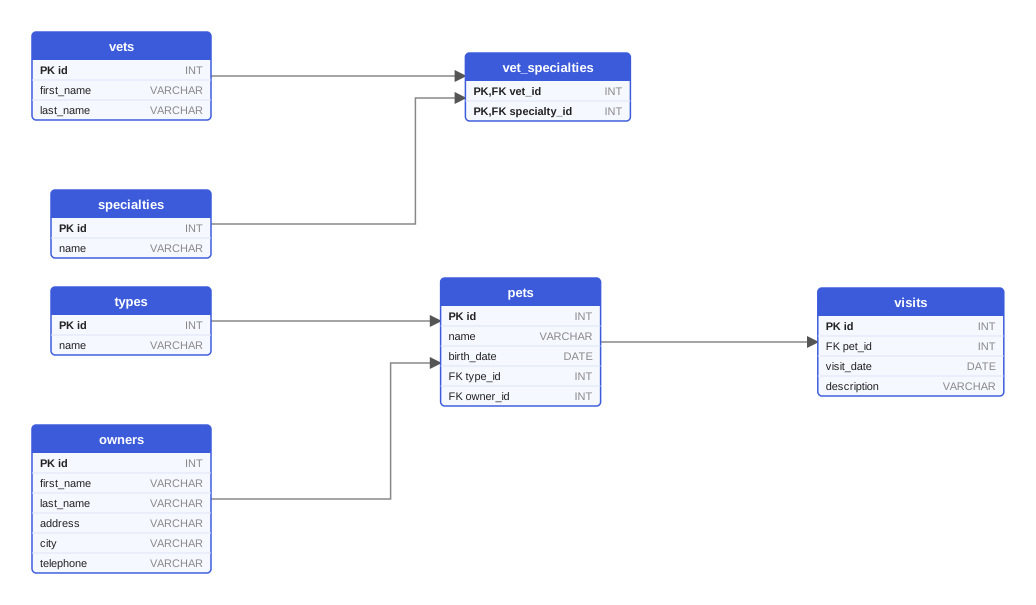
The same migrations on MySQL 9: same tables, MySQL's type names.
Three ways to turn Flyway, Liquibase, Prisma or Django migrations into an ER diagram, and a step-by-step guide to the one that always matches reality.
Run migrations against a throw-away real database on every change: a Testcontainers and Flyway example, CI service containers, version matrices and schema checks.
How to write Mermaid erDiagram blocks: entities, attributes with PK and FK markers, cardinality symbols, where they render, and what Mermaid cannot do.
One HTTP call with your migration files, one poll, one SVG. Free while we build it.