10 Database Migration Anti-Patterns and What to Do Instead
Editing applied migrations, environment-specific scripts, ORM auto-DDL in production, untested rollbacks: ten habits that break deployments, with a fix for each.
Upload the migration files of Flyway, Liquibase, Prisma, Django or 18 other tools. SchemaDrawer runs them for real, in Docker, against the exact PostgreSQL, MySQL, MariaDB, SQL Server, Oracle or SQLite version you deploy to, and returns an SVG of the schema they produce.
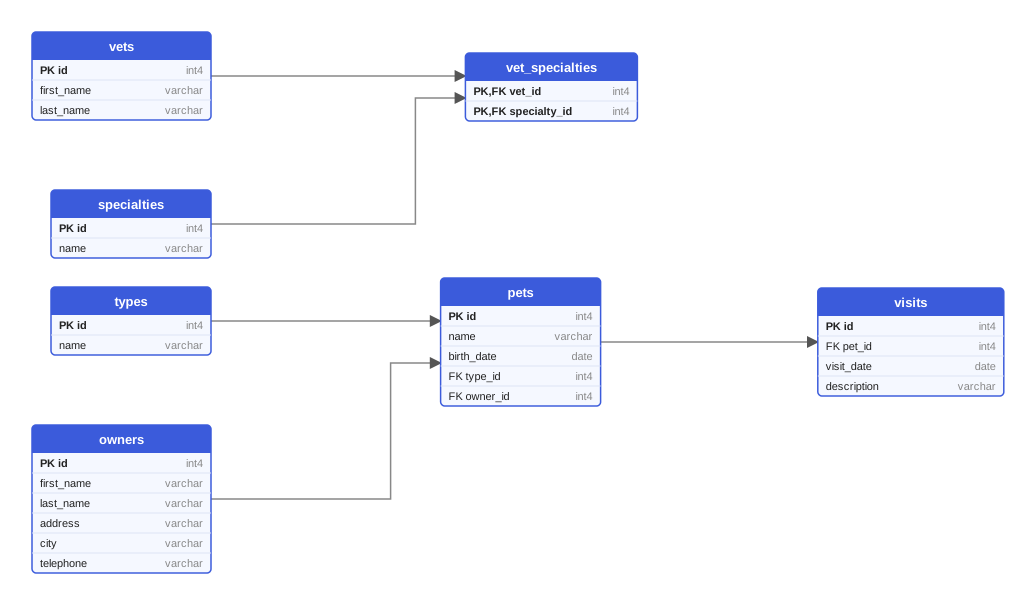
Three migration files go in. A real database starts, the real tool runs them, the schema is read back and laid out. One SVG comes out, ready for your README, wiki or pull request.
SchemaDrawer never guesses what your SQL means. It asks the database.
One multipart request with your files, the tool, the engine and its version. The answer is a job id; a repeated request with the same Request-Id is never drawn twice.
A throw-away PostgreSQL, MySQL, MariaDB, SQL Server, Oracle or SQLite of the version you named starts in Docker. Flyway, Prisma, Django or whichever tool you use applies your files to it.
Tables, columns, types, primary and foreign keys come straight from the engine's metadata, get laid out by a graph layout engine and are rendered as a crisp SVG. The link stays valid for an hour.
$ curl -X POST https://schemadrawer.com/api/v1/drawing \
    -H "Request-Id: $(uuidgen)" -F "userId=5f0c1d2e-..." \
    -F "migrationType=FLYWAY" -F "databaseType=POSTGRESQL" -F "version=18" \
    -F "files=@db/migration/V1__create_owners_and_pets.sql" \
    -F "files=@db/migration/V2__create_vets.sql" \
    -F "files=@db/migration/V3__create_visits.sql"
{"jobId":"0b6e2f4c-8d1a-4c3e-9f7a-2a5b6c7d8e9f"}

$ curl https://schemadrawer.com/api/v1/drawing/0b6e2f4c-8d1a-4c3e-9f7a-2a5b6c7d8e9f
{"status":"SUCCESS","diagramUrl":"https://.../diagram.svg"}  # 6 seconds later
Static parsers and model diffs approximate your schema. Running the migration on the engine you deploy to shows the schema you will actually get.
| Situation | Parse the SQL | Diff the ORM models | Run the migrations SchemaDrawer |
|---|---|---|---|
| Migrations written in code (Django, EF Core, Rails, Knex, Alembic) | Nothing to parse | Shows the model, not what was migrated | The tool executes them |
| Dialect-specific DDL and vendor types | One grammar per dialect, always behind | Depends on the ORM's mapping | The engine decides |
| Procedural blocks, conditional SQL, DO blocks | Skipped or misread | Invisible | Executed like everything else |
| Renames, drops and alterations across many files | Needs a simulator | Only the end state, if in sync | Applied in order, end state read back |
| Differences between engine versions | One grammar fits all | Ignored | Pick the version, PostgreSQL 10 to 18 |
| A broken migration | Best-effort error | Not detected | The tool's own error message |
Each tool runs in its own container image, in its real version. Pick yours to see what to upload.
Draw on the version you actually deploy to. Every combination of tool and engine is part of SchemaDrawer's own test suite.
Add one step to a workflow. On every change to your migrations the action uploads them, waits for the diagram and opens a pull request with the new SVG. Identical output, no pull request.
ubuntu-latest with nothing to installname: Update schema diagram
on:
push:
branches: [main]
paths: ['db/migration/**']
workflow_dispatch:
permissions:
contents: write
pull-requests: write
jobs:
draw:
runs-on: ubuntu-latest
steps:
- uses: actions/checkout@v4
- uses: schemadrawercom/action@v1
with:
sql-directory: db/migration
output-path: docs/schema-diagram.svg
migration-type: FLYWAY
database-type: POSTGRESQL
database-version: '18'
github-token: ${{ secrets.GITHUB_TOKEN }}
An e-commerce schema in four Flyway migrations, drawn on PostgreSQL 18. Types are the ones PostgreSQL reports; arrows carry the foreign-key column.
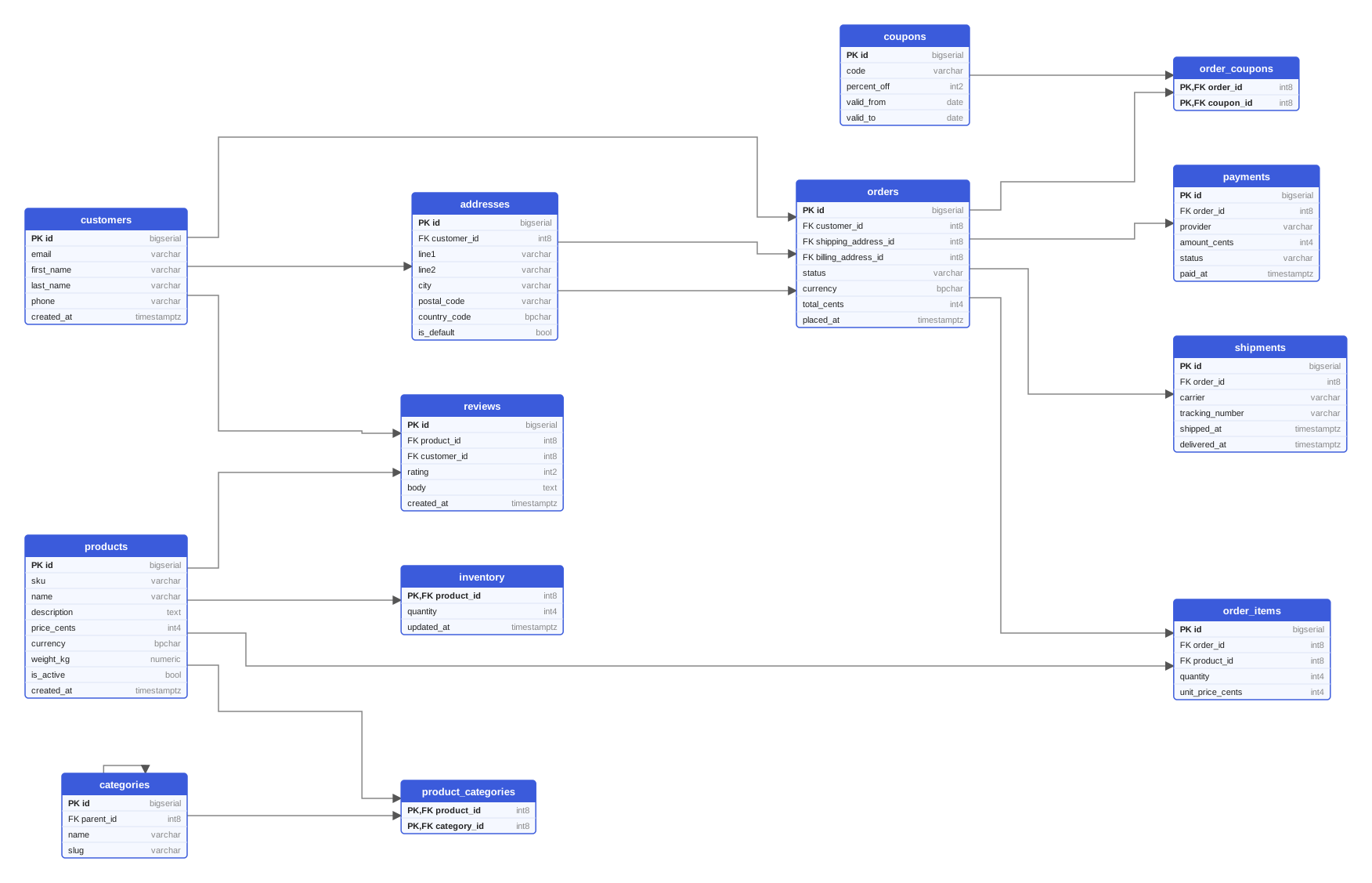
More examples: the same schema in ten tools and on six engines
No account, no card, no limits beyond the size of an upload. Enterprise plans for teams that need self-hosting, SSO and guarantees are on the way.
For every developer and every project, while we build it.
For teams with compliance, scale and support needs.
Everything else is in the docs, or an email away.
Practical writing on schema design, migration tools and keeping documentation honest.
Editing applied migrations, environment-specific scripts, ORM auto-DDL in production, untested rollbacks: ten habits that break deployments, with a fix for each.
How to change a live schema without an outage: expand, backfill in batches, switch reads and writes, then contract. With safe NOT NULL, renames and lock timeouts.
Run migrations against a throw-away real database on every change: a Testcontainers and Flyway example, CI service containers, version matrices and schema checks.
One HTTP call with your migration files, one poll, one SVG. Free while we build it.