EF Core Migrations: Add-Migration, Bundles, Idempotent Scripts and CI
What dotnet ef migrations add generates, how to apply migrations with database update, idempotent scripts and bundles, and surviving model snapshot conflicts.
Entity Framework Core migration classes, compiled and applied without your DbContext. SchemaDrawer runs EF Core 9.0 on .NET 10 against a throw-away database of the engine you choose and returns an SVG of the schema it produces.
Upload your Migrations folder as it is. The *.Designer.cs and *ModelSnapshot.cs files are dropped, the migration classes are compiled into a small runner with an empty DbContext, and they run in the order of their ids. The id comes from the [Migration("...")] attribute, or from the <timestamp>_<ClassName>.cs file name when there is none.
The sample below is the PetClinic schema written for EF Core, one of the sets SchemaDrawer's own tests draw on every engine:
Migrations/
├── 20240101120000_CreateOwnersAndPets.cs
├── 20240202120000_CreateVets.cs
└── 20240303120000_AddVisits.cs
C# migration classes deriving from Migration.
dotnet build of a project holding your files, then the migrations are applied through EF Core's migrator. The database is a fresh PostgreSQL, MySQL, MariaDB, SQL Server, Oracle or SQLite container in the version you ask for; nothing of yours is touched.
PostgreSQL 10, 11, 12, 13, 14, 15, 16, 17, 18 MySQL 8.0, 8.4, 9 MariaDB 10.6, 11.4, 11.8, 12 SQL Server 2017, 2019, 2022, 2025 Oracle SQLite
Not offered for EF Core: Oracle, SQLite. The tool ships no driver for them, so nothing could run.
migrationType=EF_COREOwners, pets, types, vets, specialties and visits: the same seven tables every sample set on this site creates. These are the exact files the tests upload.
using Microsoft.EntityFrameworkCore.Migrations;

#nullable disable

namespace Clinic.Migrations;

/// <summary>
/// Hand-written in EF Core's own migration shape. The id is given by the [Migration] attribute
/// and repeated in the file name, which is the convention `dotnet ef migrations add` follows.
/// No column is given an explicit `type:` string, so each provider maps the CLR type itself and
/// the one file produces the same schema on PostgreSQL and on MySQL.
/// </summary>
[Migration("20240101120000_CreateOwnersAndPets")]
public partial class CreateOwnersAndPets : Migration
{
    protected override void Up(MigrationBuilder migrationBuilder)
    {
        migrationBuilder.CreateTable(
            name: "owners",
            columns: table => new
            {
                id = table.Column<int>(nullable: false),
                first_name = table.Column<string>(maxLength: 50, nullable: false),
                last_name = table.Column<string>(maxLength: 50, nullable: false),
                address = table.Column<string>(maxLength: 255, nullable: true),
                city = table.Column<string>(maxLength: 80, nullable: true),
                telephone = table.Column<string>(maxLength: 20, nullable: true)
            },
            constraints: table =>
            {
                table.PrimaryKey("pk_owners", x => x.id);
            });

        migrationBuilder.CreateTable(
            name: "types",
            columns: table => new
            {
                id = table.Column<int>(nullable: false),
                name = table.Column<string>(maxLength: 80, nullable: false)
            },
            constraints: table =>
            {
                table.PrimaryKey("pk_types", x => x.id);
            });

        migrationBuilder.CreateTable(
            name: "pets",
            columns: table => new
            {
                id = table.Column<int>(nullable: false),
                name = table.Column<string>(maxLength: 50, nullable: false),
                birth_date = table.Column<DateOnly>(nullable: true),
                type_id = table.Column<int>(nullable: false),
                owner_id = table.Column<int>(nullable: false)
            },
            constraints: table =>
            {
                table.PrimaryKey("pk_pets", x => x.id);
                table.ForeignKey(
                    name: "fk_pets_types",
                    column: x => x.type_id,
                    principalTable: "types",
                    principalColumn: "id");
                table.ForeignKey(
                    name: "fk_pets_owners",
                    column: x => x.owner_id,
                    principalTable: "owners",
                    principalColumn: "id");
            });
    }

    protected override void Down(MigrationBuilder migrationBuilder)
    {
        migrationBuilder.DropTable(name: "pets");
        migrationBuilder.DropTable(name: "types");
        migrationBuilder.DropTable(name: "owners");
    }
}
using Microsoft.EntityFrameworkCore.Migrations;

#nullable disable

namespace Clinic.Migrations;

[Migration("20240202120000_CreateVets")]
public partial class CreateVets : Migration
{
    protected override void Up(MigrationBuilder migrationBuilder)
    {
        migrationBuilder.CreateTable(
            name: "vets",
            columns: table => new
            {
                id = table.Column<int>(nullable: false),
                first_name = table.Column<string>(maxLength: 50, nullable: false),
                last_name = table.Column<string>(maxLength: 50, nullable: false)
            },
            constraints: table =>
            {
                table.PrimaryKey("pk_vets", x => x.id);
            });

        migrationBuilder.CreateTable(
            name: "specialties",
            columns: table => new
            {
                id = table.Column<int>(nullable: false),
                name = table.Column<string>(maxLength: 80, nullable: false)
            },
            constraints: table =>
            {
                table.PrimaryKey("pk_specialties", x => x.id);
            });

        // The composite primary key.
        migrationBuilder.CreateTable(
            name: "vet_specialties",
            columns: table => new
            {
                vet_id = table.Column<int>(nullable: false),
                specialty_id = table.Column<int>(nullable: false)
            },
            constraints: table =>
            {
                table.PrimaryKey("pk_vet_specialties", x => new { x.vet_id, x.specialty_id });
                table.ForeignKey(
                    name: "fk_vet_specialties_vets",
                    column: x => x.vet_id,
                    principalTable: "vets",
                    principalColumn: "id");
                table.ForeignKey(
                    name: "fk_vet_specialties_specialties",
                    column: x => x.specialty_id,
                    principalTable: "specialties",
                    principalColumn: "id");
            });
    }

    protected override void Down(MigrationBuilder migrationBuilder)
    {
        migrationBuilder.DropTable(name: "vet_specialties");
        migrationBuilder.DropTable(name: "specialties");
        migrationBuilder.DropTable(name: "vets");
    }
}
using Microsoft.EntityFrameworkCore.Migrations;
#nullable disable
namespace Clinic.Migrations;
/// <summary>
/// Deliberately named so that its class name sorts *before* the other two: `AddVisits` <
/// `CreateOwnersAndPets` < `CreateVets`. It has to run last all the same, because `visits`
/// has a foreign key to `pets`. If anything but the migration id decided the order, this
/// migration would run first and the run would fail on the missing `pets` table.
/// </summary>
[Migration("20240303120000_AddVisits")]
public partial class AddVisits : Migration
{
protected override void Up(MigrationBuilder migrationBuilder)
{
migrationBuilder.CreateTable(
name: "visits",
columns: table => new
{
id = table.Column<int>(nullable: false),
pet_id = table.Column<int>(nullable: false),
visit_date = table.Column<DateOnly>(nullable: true),
description = table.Column<string>(maxLength: 255, nullable: true)
},
constraints: table =>
{
table.PrimaryKey("pk_visits", x => x.id);
table.ForeignKey(
name: "fk_visits_pets",
column: x => x.pet_id,
principalTable: "pets",
principalColumn: "id");
});
}
protected override void Down(MigrationBuilder migrationBuilder)
{
migrationBuilder.DropTable(name: "visits");
}
}
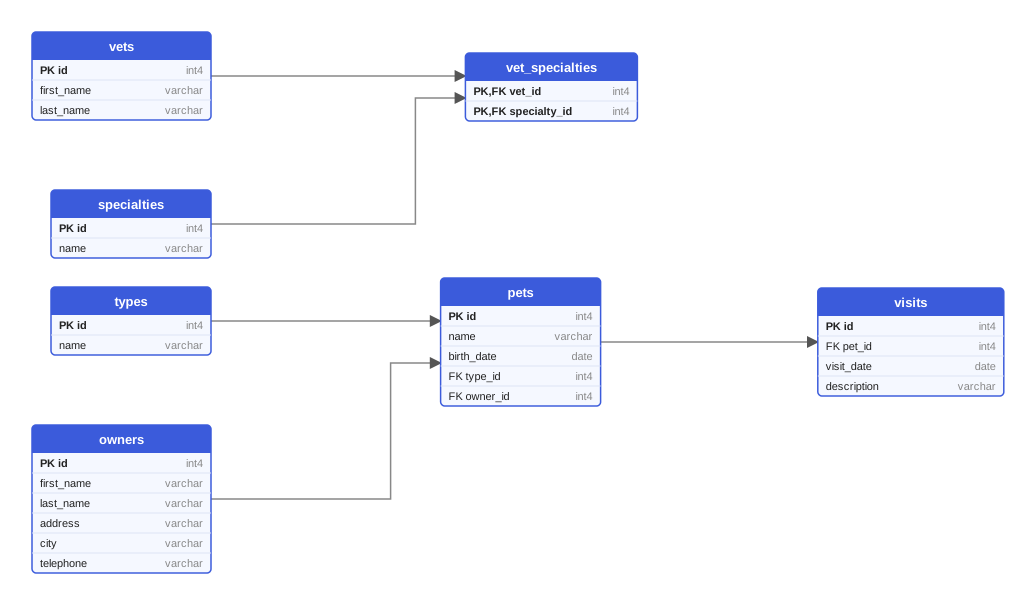
Every variant of the sample produces these seven tables. This diagram was drawn from the Flyway variant on PostgreSQL 18; on MySQL the types read INT and VARCHAR, on Oracle the names are upper case.
One multipart request queues the drawing; poll the job until it succeeds and download the SVG. Or let the GitHub Action do it and open a pull request with the diagram.
curl -X POST https://schemadrawer.com/api/v1/drawing \
  -H "Request-Id: $(uuidgen)" \
  -F "userId=5f0c1d2e-3a4b-4c5d-8e6f-7a8b9c0d1e2f" \
  -F "migrationType=EF_CORE" \
  -F "databaseType=POSTGRESQL" \
  -F "version=18" \
  -F "files=@Migrations/20240101120000_CreateOwnersAndPets.cs" \
  -F "files=@Migrations/20240202120000_CreateVets.cs" \
  -F "files=@Migrations/20240303120000_AddVisits.cs"
# {"jobId":"0b6e2f4c-8d1a-4c3e-9f7a-2a5b6c7d8e9f"}
Then poll GET https://schemadrawer.com/api/v1/drawing/{jobId} until status is SUCCESS and fetch diagramUrl. Details in the getting started guide and the API reference.
- uses: schemadrawercom/action@v1
  with:
    sql-directory: Migrations
    output-path: docs/schema-diagram.svg
    migration-type: EF_CORE
    database-type: POSTGRESQL
    database-version: '18'
    github-token: ${{ secrets.GITHUB_TOKEN }}
The action uploads the directory, waits for the diagram and opens a pull request with the SVG. See the action reference.
dotnet ef embed provider-specific store types, so a set generated for PostgreSQL will usually draw only on PostgreSQL.__EFMigrationsHistory table is left out of the diagram.What dotnet ef migrations add generates, how to apply migrations with database update, idempotent scripts and bundles, and surviving model snapshot conflicts.
DbUp runs plain SQL scripts once and journals them; FluentMigrator describes changes in C#. How each works, where each wins, and how both sit next to EF Core.
What a schema is in SQL Server, why everything lands in dbo, how default schemas work, and how Flyway, Liquibase, EF Core, DbUp and FluentMigrator target schemas.
Upload the migration directory, get an SVG back. Free while we build it.