PostgreSQL vs MySQL vs MariaDB: How to Choose a Database
A practical comparison of PostgreSQL, MySQL and MariaDB: data types, SQL conformance, transactional DDL, replication, hosting and what each means for migrations.
Run your migrations on a real MySQL 8.0, 8.4, 9 in Docker and get the resulting schema as an SVG. 22 migration tools can draw on MySQL.
Pass the version as the version field with databaseType=MYSQL. Each one is a stock image, started fresh for every drawing.
| Version | Image |
|---|---|
8.0 | mysql:8.0 |
8.4 | mysql:8.4 |
9 | mysql:9 |
MySQL has no schema inside a database, so the database itself is what the diagram reads. Type names come back in upper case: INT, VARCHAR, DATE.
The types are the names the engine's JDBC metadata reports, without lengths: an integer column reads INT, a short text VARCHAR, a calendar date DATE. Tables are read from the database; the migration tool's own bookkeeping table is left out.
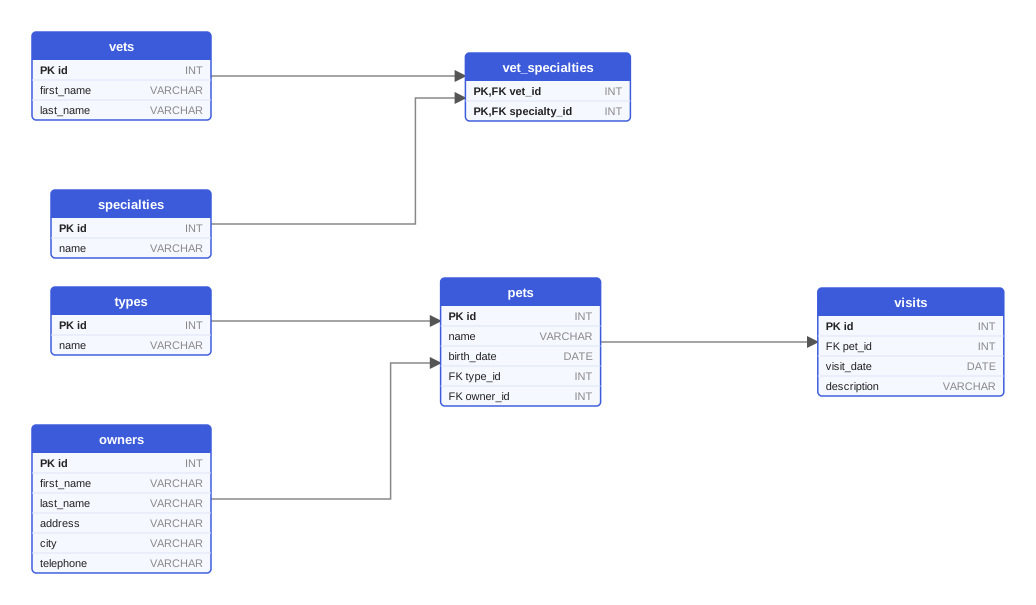
The PetClinic sample, drawn from Flyway migrations on MySQL 9. Open the SVG.
The same request works for every tool; only migrationType and the files change.
curl -X POST https://schemadrawer.com/api/v1/drawing \
  -H "Request-Id: $(uuidgen)" \
  -F "userId=5f0c1d2e-3a4b-4c5d-8e6f-7a8b9c0d1e2f" \
  -F "migrationType=FLYWAY" \
  -F "databaseType=MYSQL" \
  -F "version=9" \
  -F "files=@db/migration/V1__create_owners_and_pets.sql" \
  -F "files=@db/migration/V2__create_vets.sql" \
  -F "files=@db/migration/V3__create_visits.sql"
# {"jobId":"0b6e2f4c-8d1a-4c3e-9f7a-2a5b6c7d8e9f"}
- uses: schemadrawercom/action@v1
  with:
    sql-directory: db/migration
    output-path: docs/schema-diagram.svg
    migration-type: FLYWAY
    database-type: MYSQL
    database-version: '9'
    github-token: ${{ secrets.GITHUB_TOKEN }}
A practical comparison of PostgreSQL, MySQL and MariaDB: data types, SQL conformance, transactional DDL, replication, hosting and what each means for migrations.
Oracle folds unquoted names to upper case, PostgreSQL to lower case, MySQL depends on a setting, SQL Server on collation. The rules, and how to stay out of trouble.
A practical guide to column types in PostgreSQL, MySQL, SQL Server, Oracle and SQLite: strings, timestamps, money, booleans, JSON, enums and what diagrams report.
Upload the migration directory, pick the version you deploy to, get an SVG back.