PostgreSQL vs MySQL vs MariaDB: How to Choose a Database
A practical comparison of PostgreSQL, MySQL and MariaDB: data types, SQL conformance, transactional DDL, replication, hosting and what each means for migrations.
Run your migrations on a real PostgreSQL 10, 11, 12, 13, 14, 15, 16, 17, 18 in Docker and get the resulting schema as an SVG. 22 migration tools can draw on PostgreSQL.
Pass the version as the version field with databaseType=POSTGRESQL. Each one is a stock image, started fresh for every drawing.
| Version | Image |
|---|---|
10 | postgres:10 |
11 | postgres:11 |
12 | postgres:12 |
13 | postgres:13 |
14 | postgres:14 |
15 | postgres:15 |
16 | postgres:16 |
17 | postgres:17 |
18 | postgres:18 |
Tables land in the public schema. Type names are the internal ones PostgreSQL reports: int4 for INTEGER, int8 for BIGINT, bpchar for CHAR, timestamptz for TIMESTAMP WITH TIME ZONE.
The types are the names the engine's JDBC metadata reports, without lengths: an integer column reads int4, a short text varchar, a calendar date date. Tables are read from public; the migration tool's own bookkeeping table is left out.
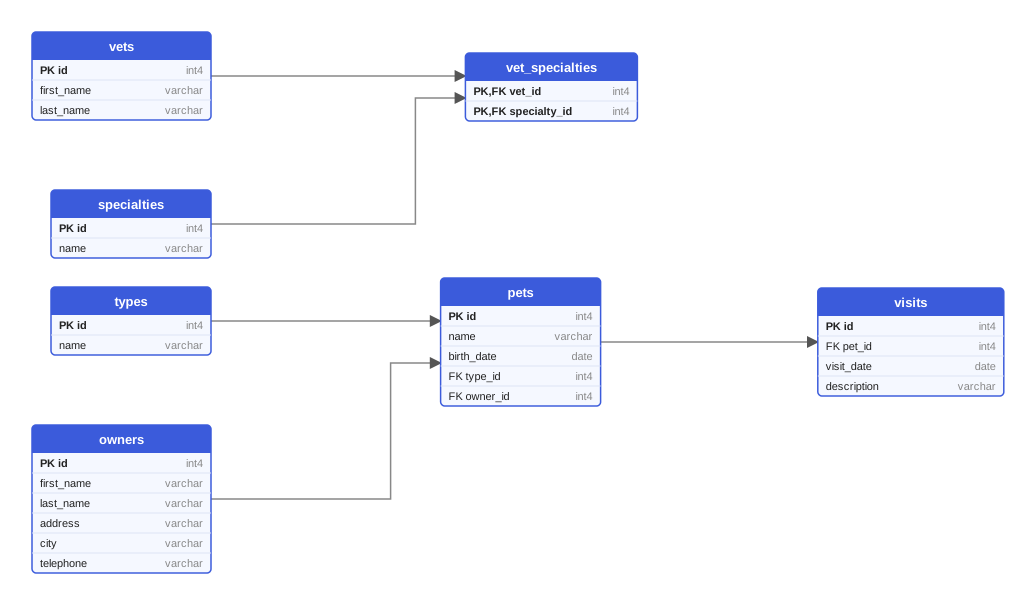
The PetClinic sample, drawn from Flyway migrations on PostgreSQL 18. Open the SVG.
The same request works for every tool; only migrationType and the files change.
curl -X POST https://schemadrawer.com/api/v1/drawing \
  -H "Request-Id: $(uuidgen)" \
  -F "userId=5f0c1d2e-3a4b-4c5d-8e6f-7a8b9c0d1e2f" \
  -F "migrationType=FLYWAY" \
  -F "databaseType=POSTGRESQL" \
  -F "version=18" \
  -F "files=@db/migration/V1__create_owners_and_pets.sql" \
  -F "files=@db/migration/V2__create_vets.sql" \
  -F "files=@db/migration/V3__create_visits.sql"
# {"jobId":"0b6e2f4c-8d1a-4c3e-9f7a-2a5b6c7d8e9f"}
- uses: schemadrawercom/action@v1
  with:
    sql-directory: db/migration
    output-path: docs/schema-diagram.svg
    migration-type: FLYWAY
    database-type: POSTGRESQL
    database-version: '18'
    github-token: ${{ secrets.GITHUB_TOKEN }}
A practical comparison of PostgreSQL, MySQL and MariaDB: data types, SQL conformance, transactional DDL, replication, hosting and what each means for migrations.
Type affinity, limited ALTER TABLE and foreign keys that are off by default: what breaks when you develop on SQLite and deploy to PostgreSQL, and how to avoid it.
Oracle folds unquoted names to upper case, PostgreSQL to lower case, MySQL depends on a setting, SQL Server on collation. The rules, and how to stay out of trouble.
Upload the migration directory, pick the version you deploy to, get an SVG back.