Knex vs Sequelize vs TypeORM vs MikroORM vs Drizzle Migrations
How five Node.js tools write, track and run database migrations, with a real migration file for each, a comparison table and advice on which one fits your project.
TypeScript migration classes extending Migration, with up() and down() running SQL. SchemaDrawer runs MikroORM 7.2 against a throw-away database of the engine you choose and returns an SVG of the schema it produces.
Upload the migration files directly, not in a nested folder: MikroORM does not look inside subdirectories, and an upload without a migration at the top level is refused. Each file exports a class extending Migration whose up() calls this.addSql(...).
The sample below is the PetClinic schema written for MikroORM, one of the sets SchemaDrawer's own tests draw on every engine:
migrations/
├── Migration20240101000001_create_owners_and_pets.ts
├── Migration20240101000002_create_vets.ts
└── Migration20240101000003_create_visits.ts
.ts, .js and .cjs files.
mikro-orm migration:up with a generated configuration that declares no entities. The database is a fresh PostgreSQL, MySQL, MariaDB, SQL Server, Oracle or SQLite container in the version you ask for; nothing of yours is touched.
PostgreSQL 10, 11, 12, 13, 14, 15, 16, 17, 18 MySQL 8.0, 8.4, 9 MariaDB 10.6, 11.4, 11.8, 12 SQL Server 2017, 2019, 2022, 2025 Oracle SQLite
Not offered for MikroORM: Oracle, SQLite. The tool ships no driver for them, so nothing could run.
migrationType=MIKRO_ORMOwners, pets, types, vets, specialties and visits: the same seven tables every sample set on this site creates. These are the exact files the tests upload.
import { Migration } from '@mikro-orm/migrations';

export class Migration20240101000001_create_owners_and_pets extends Migration {

  override name = 'Migration20240101000001_create_owners_and_pets';

  override up(): void | Promise<void> {
    this.addSql(`create table owners (
      id int not null,
      first_name varchar(50) not null,
      last_name varchar(50) not null,
      address varchar(255) null,
      city varchar(80) null,
      telephone varchar(20) null,
      constraint pk_owners primary key (id)
    )`);

    this.addSql(`create table types (
      id int not null,
      name varchar(80) not null,
      constraint pk_types primary key (id)
    )`);

    this.addSql(`create table pets (
      id int not null,
      name varchar(50) not null,
      birth_date date null,
      type_id int not null,
      owner_id int not null,
      constraint pk_pets primary key (id),
      constraint fk_pets_types foreign key (type_id) references types (id),
      constraint fk_pets_owners foreign key (owner_id) references owners (id)
    )`);
  }

  override down(): void | Promise<void> {
    this.addSql(`drop table pets`);
    this.addSql(`drop table types`);
    this.addSql(`drop table owners`);
  }

}
import { Migration } from '@mikro-orm/migrations';

export class Migration20240101000002_create_vets extends Migration {

  override name = 'Migration20240101000002_create_vets';

  override up(): void | Promise<void> {
    this.addSql(`create table vets (
      id int not null,
      first_name varchar(50) not null,
      last_name varchar(50) not null,
      constraint pk_vets primary key (id)
    )`);

    this.addSql(`create table specialties (
      id int not null,
      name varchar(80) not null,
      constraint pk_specialties primary key (id)
    )`);

    this.addSql(`create table vet_specialties (
      vet_id int not null,
      specialty_id int not null,
      constraint pk_vet_specialties primary key (vet_id, specialty_id),
      constraint fk_vet_specialties_vets foreign key (vet_id) references vets (id),
      constraint fk_vet_specialties_specialties foreign key (specialty_id) references specialties (id)
    )`);
  }

  override down(): void | Promise<void> {
    this.addSql(`drop table vet_specialties`);
    this.addSql(`drop table specialties`);
    this.addSql(`drop table vets`);
  }

}
import { Migration } from '@mikro-orm/migrations';

export class Migration20240101000003_create_visits extends Migration {

  override name = 'Migration20240101000003_create_visits';

  override up(): void | Promise<void> {
    this.addSql(`create table visits (
      id int not null,
      pet_id int not null,
      visit_date date null,
      description varchar(255) null,
      constraint pk_visits primary key (id),
      constraint fk_visits_pets foreign key (pet_id) references pets (id)
    )`);
  }

  override down(): void | Promise<void> {
    this.addSql(`drop table visits`);
  }

}
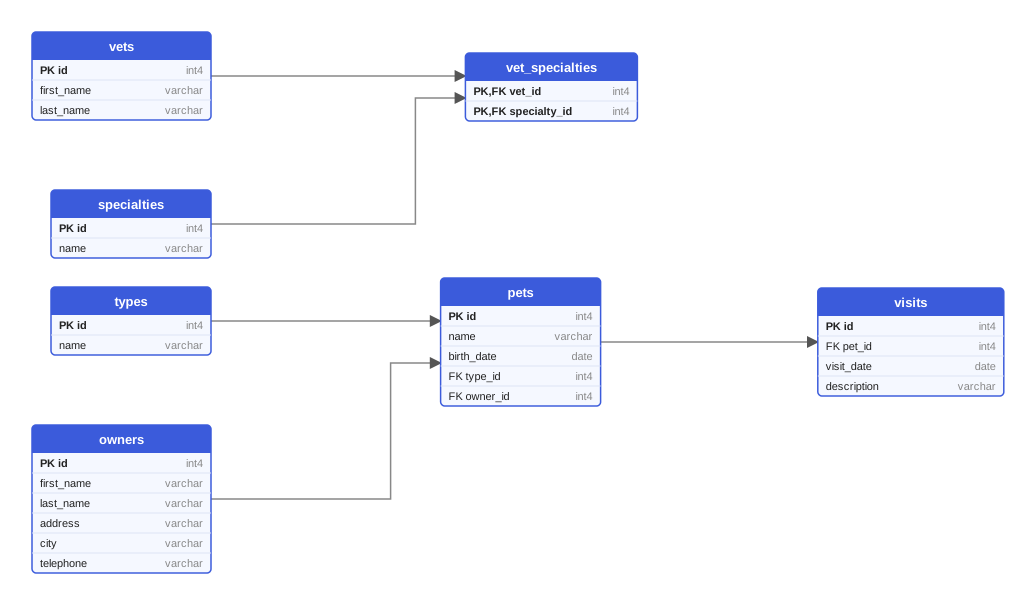
Every variant of the sample produces these seven tables. This diagram was drawn from the Flyway variant on PostgreSQL 18; on MySQL the types read INT and VARCHAR, on Oracle the names are upper case.
One multipart request queues the drawing; poll the job until it succeeds and download the SVG. Or let the GitHub Action do it and open a pull request with the diagram.
curl -X POST https://schemadrawer.com/api/v1/drawing \
  -H "Request-Id: $(uuidgen)" \
  -F "userId=5f0c1d2e-3a4b-4c5d-8e6f-7a8b9c0d1e2f" \
  -F "migrationType=MIKRO_ORM" \
  -F "databaseType=POSTGRESQL" \
  -F "version=18" \
  -F "files=@migrations/Migration20240101000001_create_owners_and_pets.ts" \
  -F "files=@migrations/Migration20240101000002_create_vets.ts" \
  -F "files=@migrations/Migration20240101000003_create_visits.ts"
# {"jobId":"0b6e2f4c-8d1a-4c3e-9f7a-2a5b6c7d8e9f"}
Then poll GET https://schemadrawer.com/api/v1/drawing/{jobId} until status is SUCCESS and fetch diagramUrl. Details in the getting started guide and the API reference.
- uses: schemadrawercom/action@v1
  with:
    sql-directory: migrations
    output-path: docs/schema-diagram.svg
    migration-type: MIKRO_ORM
    database-type: POSTGRESQL
    database-version: '18'
    github-token: ${{ secrets.GITHUB_TOKEN }}
The action uploads the directory, waits for the diagram and opens a pull request with the SVG. See the action reference.
addSql runs verbatim, so it has to be valid for the engine you draw on.mikro_orm_migrations table is left out of the diagram.How five Node.js tools write, track and run database migrations, with a real migration file for each, a comparison table and advice on which one fits your project.
Editing applied migrations, environment-specific scripts, ORM auto-DDL in production, untested rollbacks: ten habits that break deployments, with a fix for each.
How Diesel manages a schema in Rust: the CLI, timestamped folders with up.sql and down.sql, the versions table, the generated schema.rs and embedded migrations.
Upload the migration directory, get an SVG back. Free while we build it.