SQLite in Development, PostgreSQL in Production: What Breaks
Type affinity, limited ALTER TABLE and foreign keys that are off by default: what breaks when you develop on SQLite and deploy to PostgreSQL, and how to avoid it.
Run your migrations on a real SQLite latest in Docker and get the resulting schema as an SVG. 17 migration tools can draw on SQLite.
Pass the version as the version field with databaseType=SQLITE. Each one is a stock image, started fresh for every drawing.
| Version | Image |
|---|---|
latest | keinos/sqlite3:3.53.4 |
SQLite is a library, not a server, so there is no server version to pick: every migration tool brings its own copy and the one offered version is called latest.
The types are the names the engine's JDBC metadata reports, without lengths: an integer column reads INT, a short text VARCHAR, a calendar date DATE. Tables are read from main; the migration tool's own bookkeeping table is left out.
SQLite is a library rather than a server, and these tools do not carry it.
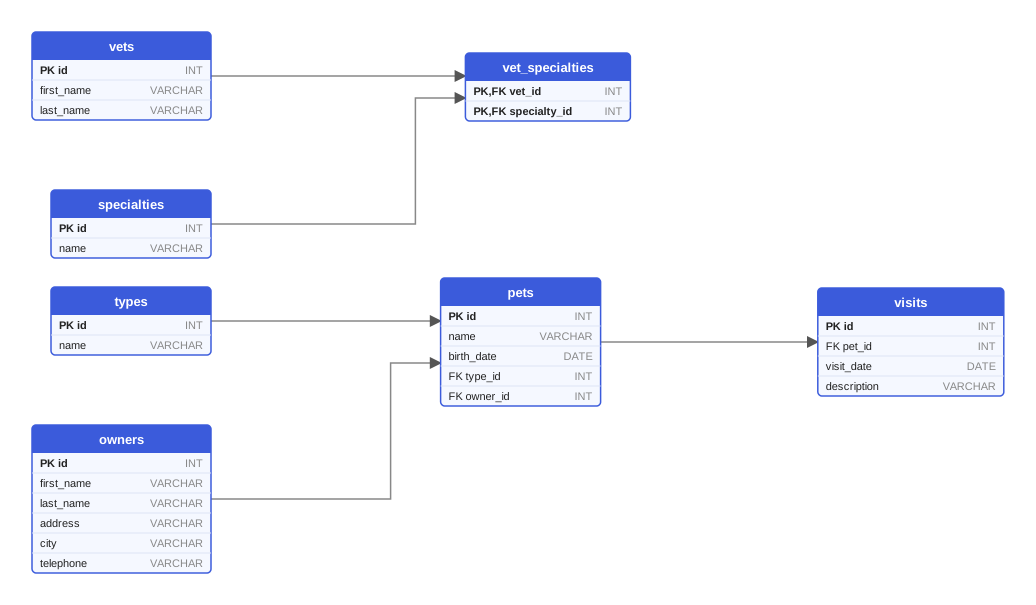
The PetClinic sample, drawn from Flyway migrations on SQLite latest. Open the SVG.
The same request works for every tool; only migrationType and the files change.
curl -X POST https://schemadrawer.com/api/v1/drawing \
  -H "Request-Id: $(uuidgen)" \
  -F "userId=5f0c1d2e-3a4b-4c5d-8e6f-7a8b9c0d1e2f" \
  -F "migrationType=FLYWAY" \
  -F "databaseType=SQLITE" \
  -F "version=latest" \
  -F "files=@db/migration/V1__create_owners_and_pets.sql" \
  -F "files=@db/migration/V2__create_vets.sql" \
  -F "files=@db/migration/V3__create_visits.sql"
# {"jobId":"0b6e2f4c-8d1a-4c3e-9f7a-2a5b6c7d8e9f"}
- uses: schemadrawercom/action@v1
  with:
    sql-directory: db/migration
    output-path: docs/schema-diagram.svg
    migration-type: FLYWAY
    database-type: SQLITE
    database-version: 'latest'
    github-token: ${{ secrets.GITHUB_TOKEN }}
Type affinity, limited ALTER TABLE and foreign keys that are off by default: what breaks when you develop on SQLite and deploy to PostgreSQL, and how to avoid it.
How Diesel manages a schema in Rust: the CLI, timestamped folders with up.sql and down.sql, the versions table, the generated schema.rs and embedded migrations.
How Alembic autogenerate compares SQLAlchemy metadata with the live database, the changes it cannot see, constraint naming conventions and SQLite batch mode.
Upload the migration directory, pick the version you deploy to, get an SVG back.