Go Migration Tools Compared: golang-migrate, goose, dbmate, Atlas
Four Go migration tools compared: file layouts, how each records applied versions, checksums, embedding in Go binaries, database support and where each fits.
SQL files with -- +goose Up and -- +goose Down sections, one version number per file. SchemaDrawer runs goose v3.28.0 against a throw-away database of the engine you choose and returns an SVG of the schema it produces.
Upload the migrations directory: files named <version>_<title>.sql with the statements under -- +goose Up and, optionally, -- +goose Down.
The sample below is the PetClinic schema written for goose, one of the sets SchemaDrawer's own tests draw on every engine:
db/migrations/
├── 00001_create_owners_and_pets.sql
├── 00002_create_vets.sql
└── 00003_create_visits.sql
SQL migrations. Go migrations are compiled into your own binary and never reach a standalone CLI, so they cannot be uploaded.
goose up. The database is a fresh PostgreSQL, MySQL, MariaDB, SQL Server, Oracle or SQLite container in the version you ask for; nothing of yours is touched.
PostgreSQL 10, 11, 12, 13, 14, 15, 16, 17, 18 MySQL 8.0, 8.4, 9 MariaDB 10.6, 11.4, 11.8, 12 SQL Server 2017, 2019, 2022, 2025 Oracle SQLite
Not offered for goose: Oracle. The tool ships no driver for it, so nothing could run.
migrationType=GOOSEOwners, pets, types, vets, specialties and visits: the same seven tables every sample set on this site creates. These are the exact files the tests upload.
-- +goose Up
CREATE TABLE owners
(
    id         INT          NOT NULL,
    first_name VARCHAR(50)  NOT NULL,
    last_name  VARCHAR(50)  NOT NULL,
    address    VARCHAR(255),
    city       VARCHAR(80),
    telephone  VARCHAR(20),
    CONSTRAINT pk_owners PRIMARY KEY (id)
);

CREATE TABLE types
(
    id   INT         NOT NULL,
    name VARCHAR(80) NOT NULL,
    CONSTRAINT pk_types PRIMARY KEY (id)
);

CREATE TABLE pets
(
    id         INT         NOT NULL,
    name       VARCHAR(50) NOT NULL,
    birth_date DATE,
    type_id    INT         NOT NULL,
    owner_id   INT         NOT NULL,
    CONSTRAINT pk_pets PRIMARY KEY (id),
    CONSTRAINT fk_pets_types FOREIGN KEY (type_id) REFERENCES types (id),
    CONSTRAINT fk_pets_owners FOREIGN KEY (owner_id) REFERENCES owners (id)
);

-- +goose Down
DROP TABLE pets;
DROP TABLE types;
DROP TABLE owners;
-- +goose Up
CREATE TABLE vets
(
    id         INT         NOT NULL,
    first_name VARCHAR(50) NOT NULL,
    last_name  VARCHAR(50) NOT NULL,
    CONSTRAINT pk_vets PRIMARY KEY (id)
);

CREATE TABLE specialties
(
    id   INT         NOT NULL,
    name VARCHAR(80) NOT NULL,
    CONSTRAINT pk_specialties PRIMARY KEY (id)
);

CREATE TABLE vet_specialties
(
    vet_id       INT NOT NULL,
    specialty_id INT NOT NULL,
    CONSTRAINT pk_vet_specialties PRIMARY KEY (vet_id, specialty_id),
    CONSTRAINT fk_vet_specialties_vets FOREIGN KEY (vet_id) REFERENCES vets (id),
    CONSTRAINT fk_vet_specialties_specialties FOREIGN KEY (specialty_id) REFERENCES specialties (id)
);

-- +goose Down
DROP TABLE vet_specialties;
DROP TABLE specialties;
DROP TABLE vets;
-- +goose Up
CREATE TABLE visits
(
    id          INT NOT NULL,
    pet_id      INT NOT NULL,
    visit_date  DATE,
    description VARCHAR(255),
    CONSTRAINT pk_visits PRIMARY KEY (id),
    CONSTRAINT fk_visits_pets FOREIGN KEY (pet_id) REFERENCES pets (id)
);

-- +goose Down
DROP TABLE visits;
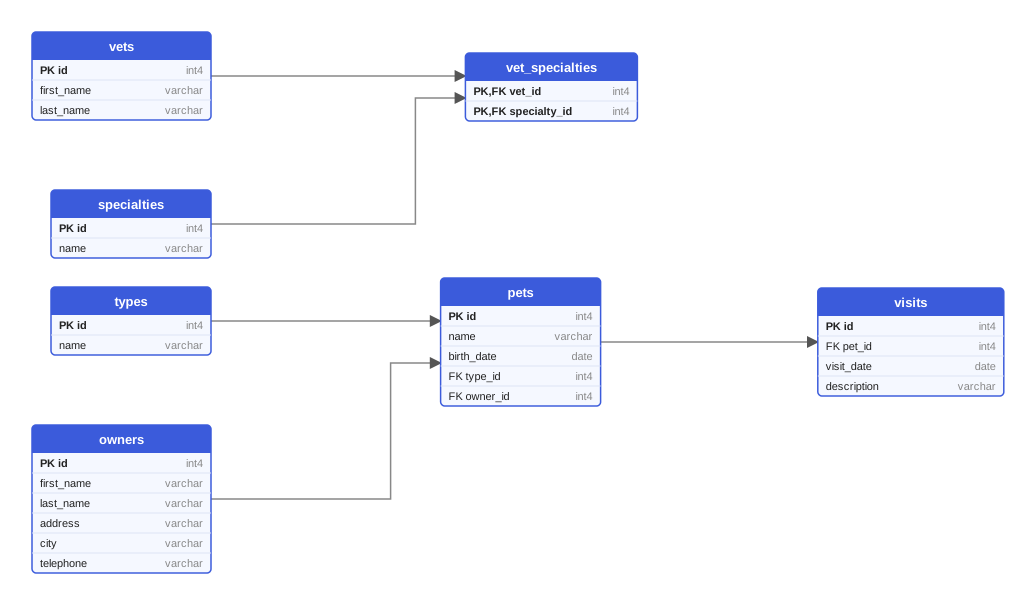
Every variant of the sample produces these seven tables. This diagram was drawn from the Flyway variant on PostgreSQL 18; on MySQL the types read INT and VARCHAR, on Oracle the names are upper case.
One multipart request queues the drawing; poll the job until it succeeds and download the SVG. Or let the GitHub Action do it and open a pull request with the diagram.
curl -X POST https://schemadrawer.com/api/v1/drawing \
  -H "Request-Id: $(uuidgen)" \
  -F "userId=5f0c1d2e-3a4b-4c5d-8e6f-7a8b9c0d1e2f" \
  -F "migrationType=GOOSE" \
  -F "databaseType=POSTGRESQL" \
  -F "version=18" \
  -F "files=@db/migrations/00001_create_owners_and_pets.sql" \
  -F "files=@db/migrations/00002_create_vets.sql" \
  -F "files=@db/migrations/00003_create_visits.sql"
# {"jobId":"0b6e2f4c-8d1a-4c3e-9f7a-2a5b6c7d8e9f"}
Then poll GET https://schemadrawer.com/api/v1/drawing/{jobId} until status is SUCCESS and fetch diagramUrl. Details in the getting started guide and the API reference.
- uses: schemadrawercom/action@v1
  with:
    sql-directory: db/migrations
    output-path: docs/schema-diagram.svg
    migration-type: GOOSE
    database-type: POSTGRESQL
    database-version: '18'
    github-token: ${{ secrets.GITHUB_TOKEN }}
The action uploads the directory, waits for the diagram and opens a pull request with the SVG. See the action reference.
Down sections are never executed.goose_db_version table is left out of the diagram.Four Go migration tools compared: file layouts, how each records applied versions, checksums, embedding in Go binaries, database support and where each fits.
Editing applied migrations, environment-specific scripts, ORM auto-DDL in production, untested rollbacks: ten habits that break deployments, with a fix for each.
How Diesel manages a schema in Rust: the CLI, timestamped folders with up.sql and down.sql, the versions table, the generated schema.rs and embedded migrations.
Upload the migration directory, get an SVG back. Free while we build it.