Liquibase Changelog Formats: XML, YAML, JSON or Formatted SQL?
Liquibase accepts XML, YAML, JSON and formatted SQL changelogs. The same table in each format, how include and includeAll work, and which format fits which team.
Changelogs in XML, YAML, JSON or formatted SQL, with a master changelog that includes the rest. SchemaDrawer runs Liquibase 5.0.4 with the JDBC driver of the chosen engine against a throw-away database of the engine you choose and returns an SVG of the schema it produces.
Upload the changelog directory as it is. The files keep their relative paths, so <include>, <includeAll> and relativeToChangelogFile="true" resolve exactly as they do on your machine.
SchemaDrawer picks the root changelog by name, preferring files at the top level: db.changelog-master, db.changelog-root, changelog-master, master.changelog, db.changelog, changelog or master, with any of the extensions .xml, .yaml, .yml, .json or .sql. An upload with a single changelog file uses that file whatever its name. Two files that could both be the root are refused with a message naming them.
The sample below is the PetClinic schema written for Liquibase, one of the sets SchemaDrawer's own tests draw on every engine:
src/main/resources/db/changelog/
├── changes/
│   ├── 001-owners-and-pets.xml
│   ├── 002-vets.xml
│   └── 003-visits.xml
└── db.changelog-master.xml
XML, YAML, JSON and formatted SQL changelogs.
liquibase update with the upload as search path and the resolved root as --changelog-file. The database is a fresh PostgreSQL, MySQL, MariaDB, SQL Server, Oracle or SQLite container in the version you ask for; nothing of yours is touched.
PostgreSQL 10, 11, 12, 13, 14, 15, 16, 17, 18 MySQL 8.0, 8.4, 9 MariaDB 10.6, 11.4, 11.8, 12 SQL Server 2017, 2019, 2022, 2025 Oracle 21, 23 SQLite
migrationType=LIQUIBASEOwners, pets, types, vets, specialties and visits: the same seven tables every sample set on this site creates. These are the exact files the tests upload.
<?xml version="1.0" encoding="UTF-8"?>
<databaseChangeLog xmlns="http://www.liquibase.org/xml/ns/dbchangelog"
                   xmlns:xsi="http://www.w3.org/2001/XMLSchema-instance"
                   xsi:schemaLocation="http://www.liquibase.org/xml/ns/dbchangelog
                                       http://www.liquibase.org/xml/ns/dbchangelog/dbchangelog-latest.xsd">

    <changeSet id="001-owners" author="schemadrawer">
        <createTable tableName="owners">
            <column name="id" type="INT">
                <constraints primaryKey="true" primaryKeyName="pk_owners" nullable="false"/>
            </column>
            <column name="first_name" type="VARCHAR(50)">
                <constraints nullable="false"/>
            </column>
            <column name="last_name" type="VARCHAR(50)">
                <constraints nullable="false"/>
            </column>
            <column name="address" type="VARCHAR(255)"/>
            <column name="city" type="VARCHAR(80)"/>
            <column name="telephone" type="VARCHAR(20)"/>
        </createTable>
    </changeSet>

    <changeSet id="001-types" author="schemadrawer">
        <createTable tableName="types">
            <column name="id" type="INT">
                <constraints primaryKey="true" primaryKeyName="pk_types" nullable="false"/>
            </column>
            <column name="name" type="VARCHAR(80)">
                <constraints nullable="false"/>
            </column>
        </createTable>
    </changeSet>

    <changeSet id="001-pets" author="schemadrawer">
        <createTable tableName="pets">
            <column name="id" type="INT">
                <constraints primaryKey="true" primaryKeyName="pk_pets" nullable="false"/>
            </column>
            <column name="name" type="VARCHAR(50)">
                <constraints nullable="false"/>
            </column>
            <column name="birth_date" type="DATE"/>
            <column name="type_id" type="INT">
                <constraints nullable="false"
                             foreignKeyName="fk_pets_types"
                             references="types(id)"/>
            </column>
            <column name="owner_id" type="INT">
                <constraints nullable="false"
                             foreignKeyName="fk_pets_owners"
                             references="owners(id)"/>
            </column>
        </createTable>
    </changeSet>

</databaseChangeLog>
<?xml version="1.0" encoding="UTF-8"?>
<databaseChangeLog xmlns="http://www.liquibase.org/xml/ns/dbchangelog"
                   xmlns:xsi="http://www.w3.org/2001/XMLSchema-instance"
                   xsi:schemaLocation="http://www.liquibase.org/xml/ns/dbchangelog
                                       http://www.liquibase.org/xml/ns/dbchangelog/dbchangelog-latest.xsd">

    <changeSet id="002-vets" author="schemadrawer">
        <createTable tableName="vets">
            <column name="id" type="INT">
                <constraints primaryKey="true" primaryKeyName="pk_vets" nullable="false"/>
            </column>
            <column name="first_name" type="VARCHAR(50)">
                <constraints nullable="false"/>
            </column>
            <column name="last_name" type="VARCHAR(50)">
                <constraints nullable="false"/>
            </column>
        </createTable>
    </changeSet>

    <changeSet id="002-specialties" author="schemadrawer">
        <createTable tableName="specialties">
            <column name="id" type="INT">
                <constraints primaryKey="true" primaryKeyName="pk_specialties" nullable="false"/>
            </column>
            <column name="name" type="VARCHAR(80)">
                <constraints nullable="false"/>
            </column>
        </createTable>
    </changeSet>

    <changeSet id="002-vet-specialties" author="schemadrawer">
        <createTable tableName="vet_specialties">
            <!--
                The composite key is declared here rather than added afterwards: SQLite cannot add a
                primary key to a table that already exists, and Liquibase refuses addPrimaryKey
                there outright. Naming both columns inside createTable makes one composite key, and
                every engine takes it.
            -->
            <column name="vet_id" type="INT">
                <constraints nullable="false"
                             primaryKey="true"
                             primaryKeyName="pk_vet_specialties"
                             foreignKeyName="fk_vet_specialties_vets"
                             references="vets(id)"/>
            </column>
            <column name="specialty_id" type="INT">
                <constraints nullable="false"
                             primaryKey="true"
                             primaryKeyName="pk_vet_specialties"
                             foreignKeyName="fk_vet_specialties_specialties"
                             references="specialties(id)"/>
            </column>
        </createTable>
    </changeSet>

</databaseChangeLog>
<?xml version="1.0" encoding="UTF-8"?>
<databaseChangeLog xmlns="http://www.liquibase.org/xml/ns/dbchangelog"
                   xmlns:xsi="http://www.w3.org/2001/XMLSchema-instance"
                   xsi:schemaLocation="http://www.liquibase.org/xml/ns/dbchangelog
                                       http://www.liquibase.org/xml/ns/dbchangelog/dbchangelog-latest.xsd">

    <changeSet id="003-visits" author="schemadrawer">
        <createTable tableName="visits">
            <column name="id" type="INT">
                <constraints primaryKey="true" primaryKeyName="pk_visits" nullable="false"/>
            </column>
            <column name="pet_id" type="INT">
                <constraints nullable="false"
                             foreignKeyName="fk_visits_pets"
                             references="pets(id)"/>
            </column>
            <column name="visit_date" type="DATE"/>
            <column name="description" type="VARCHAR(255)"/>
        </createTable>
    </changeSet>

</databaseChangeLog>
<?xml version="1.0" encoding="UTF-8"?>
<databaseChangeLog xmlns="http://www.liquibase.org/xml/ns/dbchangelog"
                   xmlns:xsi="http://www.w3.org/2001/XMLSchema-instance"
                   xsi:schemaLocation="http://www.liquibase.org/xml/ns/dbchangelog
                                       http://www.liquibase.org/xml/ns/dbchangelog/dbchangelog-latest.xsd">

    <include file="changes/001-owners-and-pets.xml" relativeToChangelogFile="true"/>
    <include file="changes/002-vets.xml" relativeToChangelogFile="true"/>
    <include file="changes/003-visits.xml" relativeToChangelogFile="true"/>

</databaseChangeLog>
db.changelog-master.sql
--liquibase formatted sql
--
-- Formatted SQL changelog. Splitting one of these across several files needs Liquibase's
-- "include in Formatted SQL changelog" feature, which is licensed, so the open source form is a
-- single file holding every changeset.

--changeset schemadrawer:001-owners
CREATE TABLE owners
(
    id         INT          NOT NULL,
    first_name VARCHAR(50)  NOT NULL,
    last_name  VARCHAR(50)  NOT NULL,
    address    VARCHAR(255),
    city       VARCHAR(80),
    telephone  VARCHAR(20),
    CONSTRAINT pk_owners PRIMARY KEY (id)
);

--changeset schemadrawer:002-types
CREATE TABLE types
(
    id   INT         NOT NULL,
    name VARCHAR(80) NOT NULL,
    CONSTRAINT pk_types PRIMARY KEY (id)
);

--changeset schemadrawer:003-pets
CREATE TABLE pets
(
    id         INT         NOT NULL,
    name       VARCHAR(50) NOT NULL,
    birth_date DATE,
    type_id    INT         NOT NULL,
    owner_id   INT         NOT NULL,
    CONSTRAINT pk_pets PRIMARY KEY (id),
    CONSTRAINT fk_pets_types FOREIGN KEY (type_id) REFERENCES types (id),
    CONSTRAINT fk_pets_owners FOREIGN KEY (owner_id) REFERENCES owners (id)
);

--changeset schemadrawer:004-vets
CREATE TABLE vets
(
    id         INT         NOT NULL,
    first_name VARCHAR(50) NOT NULL,
    last_name  VARCHAR(50) NOT NULL,
    CONSTRAINT pk_vets PRIMARY KEY (id)
);

--changeset schemadrawer:005-specialties
CREATE TABLE specialties
(
    id   INT         NOT NULL,
    name VARCHAR(80) NOT NULL,
    CONSTRAINT pk_specialties PRIMARY KEY (id)
);

--changeset schemadrawer:006-vet-specialties
CREATE TABLE vet_specialties
(
    vet_id       INT NOT NULL,
    specialty_id INT NOT NULL,
    CONSTRAINT pk_vet_specialties PRIMARY KEY (vet_id, specialty_id),
    CONSTRAINT fk_vet_specialties_vets FOREIGN KEY (vet_id) REFERENCES vets (id),
    CONSTRAINT fk_vet_specialties_specialties FOREIGN KEY (specialty_id) REFERENCES specialties (id)
);

--changeset schemadrawer:007-visits
CREATE TABLE visits
(
    id          INT NOT NULL,
    pet_id      INT NOT NULL,
    visit_date  DATE,
    description VARCHAR(255),
    CONSTRAINT pk_visits PRIMARY KEY (id),
    CONSTRAINT fk_visits_pets FOREIGN KEY (pet_id) REFERENCES pets (id)
);
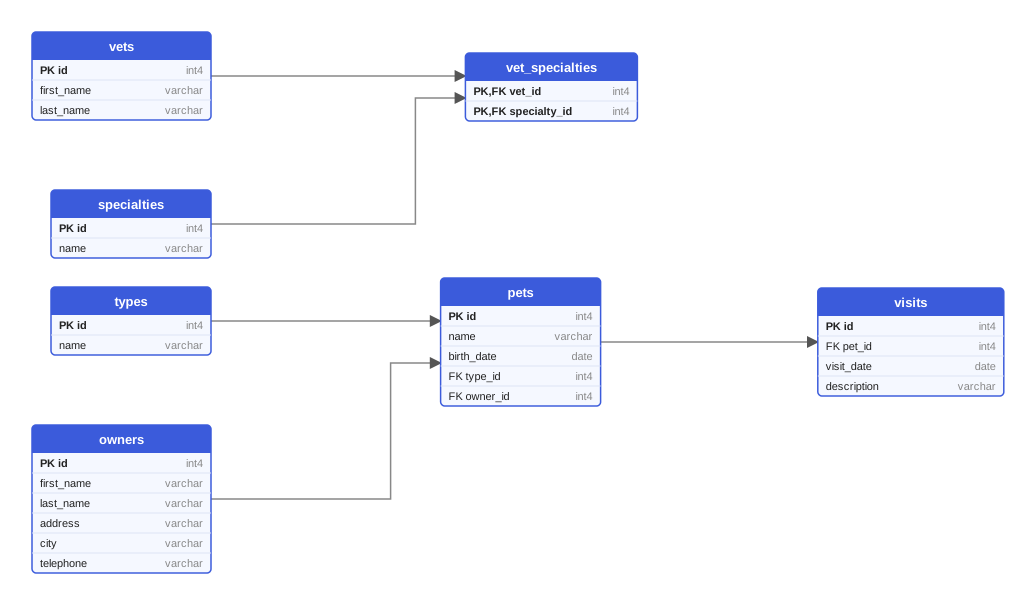
Every variant of the sample produces these seven tables. This diagram was drawn from the Flyway variant on PostgreSQL 18; on MySQL the types read INT and VARCHAR, on Oracle the names are upper case.
One multipart request queues the drawing; poll the job until it succeeds and download the SVG. Or let the GitHub Action do it and open a pull request with the diagram.
curl -X POST https://schemadrawer.com/api/v1/drawing \
  -H "Request-Id: $(uuidgen)" \
  -F "userId=5f0c1d2e-3a4b-4c5d-8e6f-7a8b9c0d1e2f" \
  -F "migrationType=LIQUIBASE" \
  -F "databaseType=POSTGRESQL" \
  -F "version=18" \
  -F "files=@src/main/resources/db/changelog/changes/001-owners-and-pets.xml;filename=changes/001-owners-and-pets.xml" \
  -F "files=@src/main/resources/db/changelog/changes/002-vets.xml;filename=changes/002-vets.xml" \
  -F "files=@src/main/resources/db/changelog/changes/003-visits.xml;filename=changes/003-visits.xml" \
  -F "files=@src/main/resources/db/changelog/db.changelog-master.xml"
# {"jobId":"0b6e2f4c-8d1a-4c3e-9f7a-2a5b6c7d8e9f"}
Then poll GET https://schemadrawer.com/api/v1/drawing/{jobId} until status is SUCCESS and fetch diagramUrl. Details in the getting started guide and the API reference.
- uses: schemadrawercom/action@v1
  with:
    sql-directory: src/main/resources/db/changelog
    output-path: docs/schema-diagram.svg
    migration-type: LIQUIBASE
    database-type: POSTGRESQL
    database-version: '18'
    github-token: ${{ secrets.GITHUB_TOKEN }}
The action uploads the directory, waits for the diagram and opens a pull request with the SVG. See the action reference.
databasechangelog and databasechangeloglock are left out of the diagram.Liquibase accepts XML, YAML, JSON and formatted SQL changelogs. The same table in each format, how include and includeAll work, and which format fits which team.
A practical comparison of Flyway and Liquibase: migration model, file formats, rollback, checksums and validation, integrations, and a decision guide for teams.
Editing applied migrations, environment-specific scripts, ORM auto-DDL in production, untested rollbacks: ten habits that break deployments, with a fix for each.
Upload the migration directory, get an SVG back. Free while we build it.