TypeORM Migrations Guide: Generate, Run and Avoid synchronize
TypeORM migrations in practice: DataSource setup, generate versus create, running TypeScript migrations, migrationsRun, and why synchronize is unsafe in production.
TypeScript migration classes implementing MigrationInterface, as typeorm migration:generate writes them. SchemaDrawer runs TypeORM 1.1 against a throw-away database of the engine you choose and returns an SVG of the schema it produces.
Upload the migration classes, at any depth. Each implements MigrationInterface and TypeORM orders them by the timestamp in the class name, not by file name. Keep helper modules out of the upload: TypeORM loads every exported class it finds.
The sample below is the PetClinic schema written for TypeORM, one of the sets SchemaDrawer's own tests draw on every engine:
src/migrations/
├── 1704067201000-create-owners-and-pets.ts
├── 1704067202000-create-vets.ts
└── 1704067203000-create-visits.ts
.ts, .cts, .mts, .js, .cjs and .mjs files, transpiled on the fly.
typeorm migration:run with a data source generated for the chosen engine (entities: [], synchronize: false). The database is a fresh PostgreSQL, MySQL, MariaDB, SQL Server, Oracle or SQLite container in the version you ask for; nothing of yours is touched.
PostgreSQL 10, 11, 12, 13, 14, 15, 16, 17, 18 MySQL 8.0, 8.4, 9 MariaDB 10.6, 11.4, 11.8, 12 SQL Server 2017, 2019, 2022, 2025 Oracle 21, 23 SQLite
migrationType=TYPEORMOwners, pets, types, vets, specialties and visits: the same seven tables every sample set on this site creates. These are the exact files the tests upload.
import { MigrationInterface, QueryRunner } from 'typeorm';

export class CreateOwnersAndPets1704067201000 implements MigrationInterface {

    name = 'CreateOwnersAndPets1704067201000';

    public async up(queryRunner: QueryRunner): Promise<void> {
        await queryRunner.query(`CREATE TABLE owners (
            id         INT          NOT NULL,
            first_name VARCHAR(50)  NOT NULL,
            last_name  VARCHAR(50)  NOT NULL,
            address    VARCHAR(255),
            city       VARCHAR(80),
            telephone  VARCHAR(20),
            CONSTRAINT pk_owners PRIMARY KEY (id)
        )`);

        await queryRunner.query(`CREATE TABLE types (
            id   INT         NOT NULL,
            name VARCHAR(80) NOT NULL,
            CONSTRAINT pk_types PRIMARY KEY (id)
        )`);

        await queryRunner.query(`CREATE TABLE pets (
            id         INT         NOT NULL,
            name       VARCHAR(50) NOT NULL,
            birth_date DATE,
            type_id    INT         NOT NULL,
            owner_id   INT         NOT NULL,
            CONSTRAINT pk_pets PRIMARY KEY (id),
            CONSTRAINT fk_pets_types FOREIGN KEY (type_id) REFERENCES types (id),
            CONSTRAINT fk_pets_owners FOREIGN KEY (owner_id) REFERENCES owners (id)
        )`);
    }

    public async down(queryRunner: QueryRunner): Promise<void> {
        await queryRunner.query(`DROP TABLE pets`);
        await queryRunner.query(`DROP TABLE types`);
        await queryRunner.query(`DROP TABLE owners`);
    }

}
import { MigrationInterface, QueryRunner } from 'typeorm';

export class CreateVets1704067202000 implements MigrationInterface {

    name = 'CreateVets1704067202000';

    public async up(queryRunner: QueryRunner): Promise<void> {
        await queryRunner.query(`CREATE TABLE vets (
            id         INT         NOT NULL,
            first_name VARCHAR(50) NOT NULL,
            last_name  VARCHAR(50) NOT NULL,
            CONSTRAINT pk_vets PRIMARY KEY (id)
        )`);

        await queryRunner.query(`CREATE TABLE specialties (
            id   INT         NOT NULL,
            name VARCHAR(80) NOT NULL,
            CONSTRAINT pk_specialties PRIMARY KEY (id)
        )`);

        await queryRunner.query(`CREATE TABLE vet_specialties (
            vet_id       INT NOT NULL,
            specialty_id INT NOT NULL,
            CONSTRAINT pk_vet_specialties PRIMARY KEY (vet_id, specialty_id),
            CONSTRAINT fk_vet_specialties_vets FOREIGN KEY (vet_id) REFERENCES vets (id),
            CONSTRAINT fk_vet_specialties_specialties FOREIGN KEY (specialty_id) REFERENCES specialties (id)
        )`);
    }

    public async down(queryRunner: QueryRunner): Promise<void> {
        await queryRunner.query(`DROP TABLE vet_specialties`);
        await queryRunner.query(`DROP TABLE specialties`);
        await queryRunner.query(`DROP TABLE vets`);
    }

}
import { MigrationInterface, QueryRunner } from 'typeorm';

export class CreateVisits1704067203000 implements MigrationInterface {

    name = 'CreateVisits1704067203000';

    public async up(queryRunner: QueryRunner): Promise<void> {
        await queryRunner.query(`CREATE TABLE visits (
            id          INT NOT NULL,
            pet_id      INT NOT NULL,
            visit_date  DATE,
            description VARCHAR(255),
            CONSTRAINT pk_visits PRIMARY KEY (id),
            CONSTRAINT fk_visits_pets FOREIGN KEY (pet_id) REFERENCES pets (id)
        )`);
    }

    public async down(queryRunner: QueryRunner): Promise<void> {
        await queryRunner.query(`DROP TABLE visits`);
    }

}
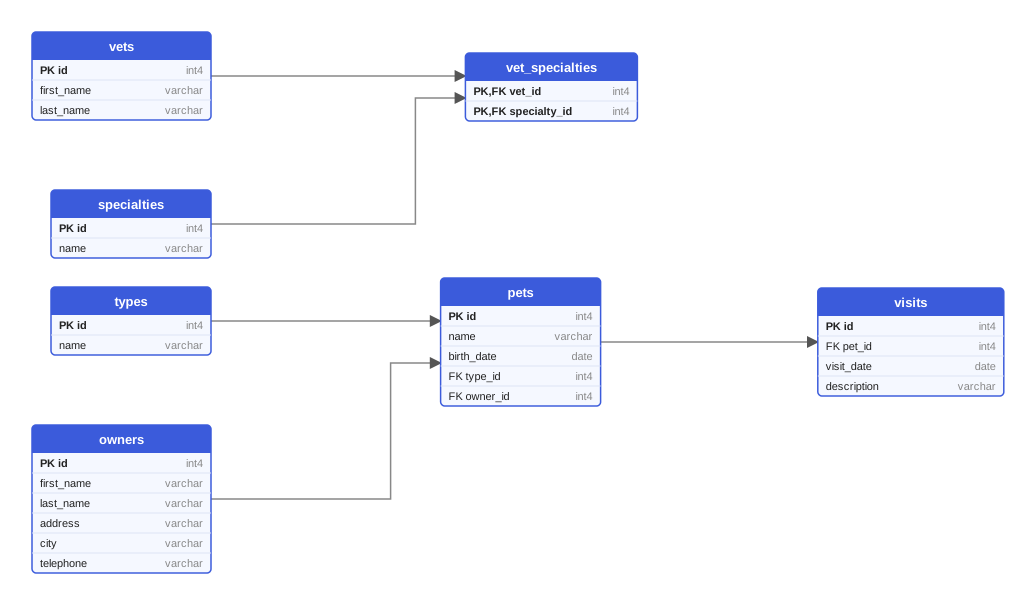
Every variant of the sample produces these seven tables. This diagram was drawn from the Flyway variant on PostgreSQL 18; on MySQL the types read INT and VARCHAR, on Oracle the names are upper case.
One multipart request queues the drawing; poll the job until it succeeds and download the SVG. Or let the GitHub Action do it and open a pull request with the diagram.
curl -X POST https://schemadrawer.com/api/v1/drawing \
  -H "Request-Id: $(uuidgen)" \
  -F "userId=5f0c1d2e-3a4b-4c5d-8e6f-7a8b9c0d1e2f" \
  -F "migrationType=TYPEORM" \
  -F "databaseType=POSTGRESQL" \
  -F "version=18" \
  -F "files=@src/migrations/1704067201000-create-owners-and-pets.ts" \
  -F "files=@src/migrations/1704067202000-create-vets.ts" \
  -F "files=@src/migrations/1704067203000-create-visits.ts"
# {"jobId":"0b6e2f4c-8d1a-4c3e-9f7a-2a5b6c7d8e9f"}
Then poll GET https://schemadrawer.com/api/v1/drawing/{jobId} until status is SUCCESS and fetch diagramUrl. Details in the getting started guide and the API reference.
- uses: schemadrawercom/action@v1
  with:
    sql-directory: src/migrations
    output-path: docs/schema-diagram.svg
    migration-type: TYPEORM
    database-type: POSTGRESQL
    database-version: '18'
    github-token: ${{ secrets.GITHUB_TOKEN }}
The action uploads the directory, waits for the diagram and opens a pull request with the SVG. See the action reference.
migrations table is left out of the diagram, so a table of your own with that name would disappear too.TypeORM migrations in practice: DataSource setup, generate versus create, running TypeScript migrations, migrationsRun, and why synchronize is unsafe in production.
How five Node.js tools write, track and run database migrations, with a real migration file for each, a comparison table and advice on which one fits your project.
Editing applied migrations, environment-specific scripts, ORM auto-DDL in production, untested rollbacks: ten habits that break deployments, with a fix for each.
Upload the migration directory, get an SVG back. Free while we build it.